Live rooms
The admin panel includes a live room inspector that lists every active room the matchmaker knows about. It exposes the operational actions you’d otherwise wire by hand. You can kick a client, lock or unlock a room for matchmaking, edit state in place, or force-dispose a stuck room. No per-room wiring is required. The inspector talks to rooms through matchMaker.remoteRoomCall(), the same IPC the framework uses internally. It therefore works with any matchmaker driver and presence combination.
Listing rooms
Live rooms in the sidebar lists every room returned by the matchmaker driver. The table shows Room ID, Name, Clients, Max clients, Locked status (with a private badge when set), Uptime and Process. It refreshes every 3 seconds, filters by locked state, and searches by room id, name or process id. Pages hold 20 rows.
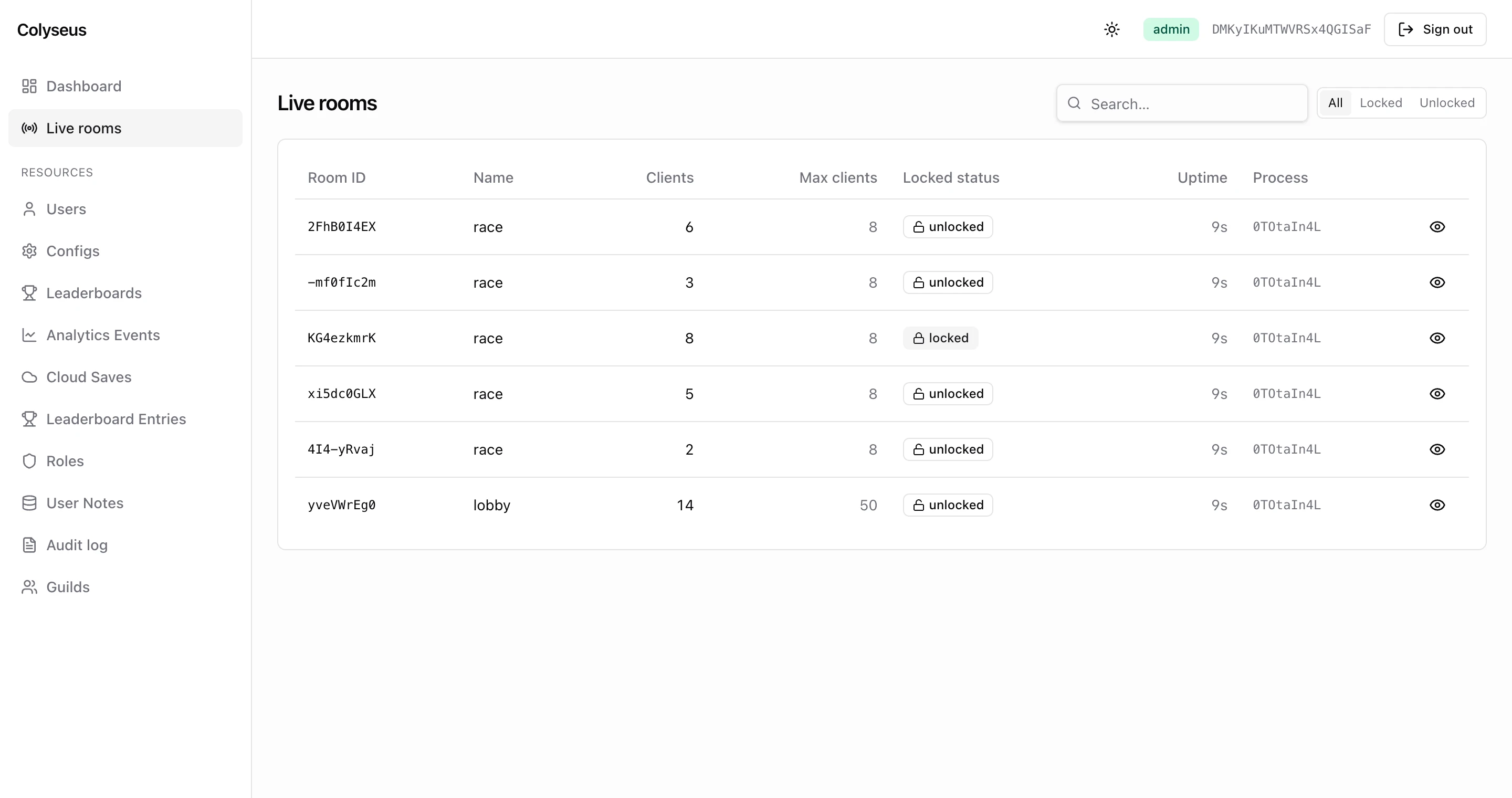
The underlying GET /admin-api/rooms returns one object per room:
{
    "roomId": "QcxWRrptI",
    "name": "race",
    "clients": 6,
    "maxClients": 8,            // null when uncapped
    "locked": false,
    "private": false,
    "createdAt": "2026-08-20T20:45:15.000Z",
    "elapsedTime": 52113,       // ms since createdAt
    "processId": "RxW29a6gr",   // which Node process hosts the room
    "publicAddress": null
}
Clicking through to a room opens the detail page. It shows a stat strip (clients, locked status, uptime, state size in bytes), the client list, and the state tree with a search box. The room’s metadata appears when set, and the action buttons sit at the top. The page polls every 2 seconds and pauses while you edit a value.
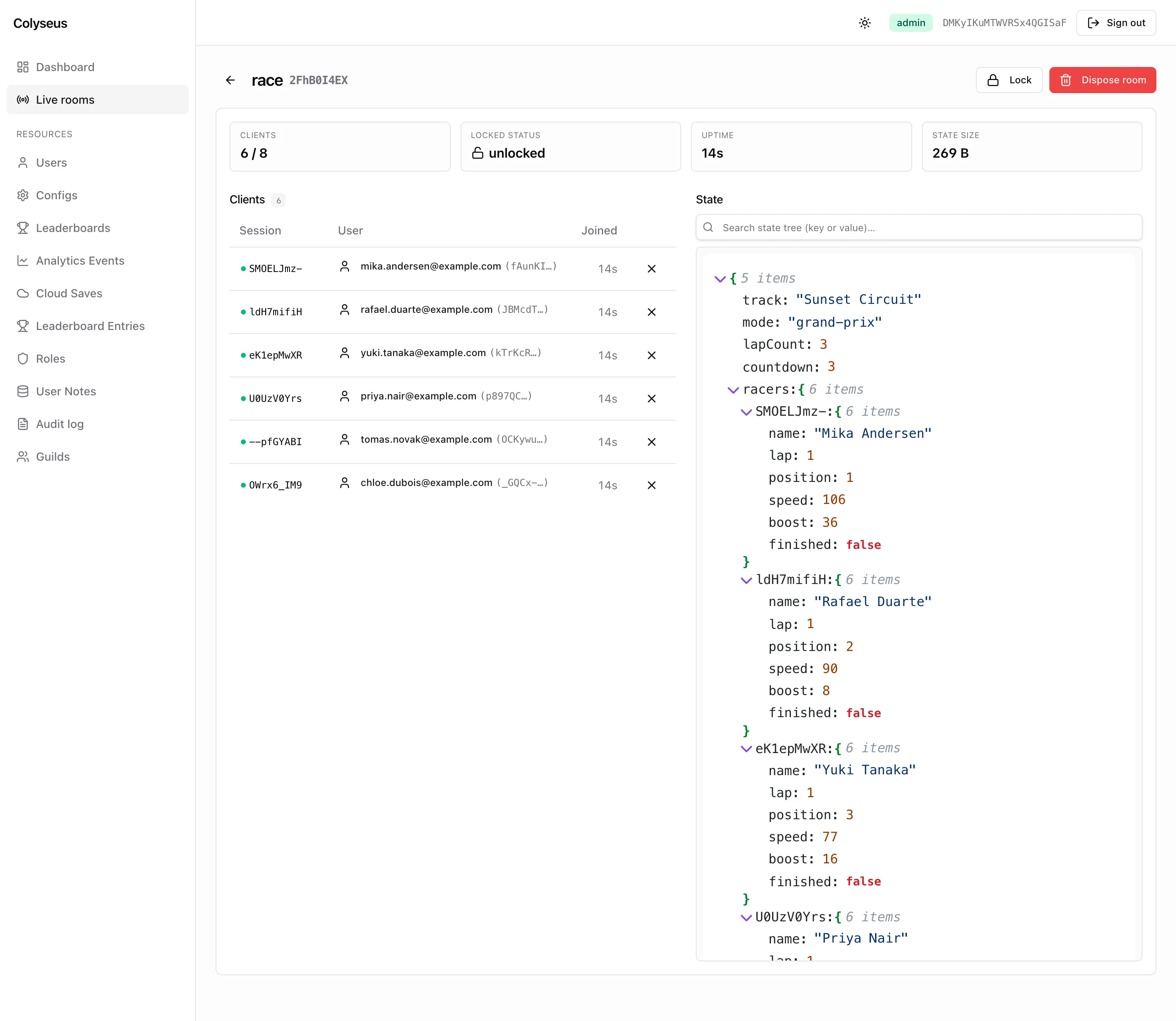
The client list comes from the room itself (GET /admin-api/rooms/:roomId calls Room#getInspectorView()). Each entry carries the sessionId and the join time. When your onAuth returned a user, the entry also carries the userId / userEmail read from client.auth, and the email links to the user’s show page. A green dot marks sessions whose id appears as a key in the state tree.
Actions
Every mutation listed here is recorded to the audit log with resource: "rooms" and the room id as target_id. The payload always includes the operator’s ip and userAgent next to the fields named below.
Kick a client
Drop a single client from a room with an optional reason (120 characters max). The room closes the connection with code 4000 (CloseCode.CONSENTED) and the reason in the close frame. On the client, room.onLeave((code, reason) => …) runs and the SDK does not try to reconnect. On the server, the onLeave hook sees a consented leave.
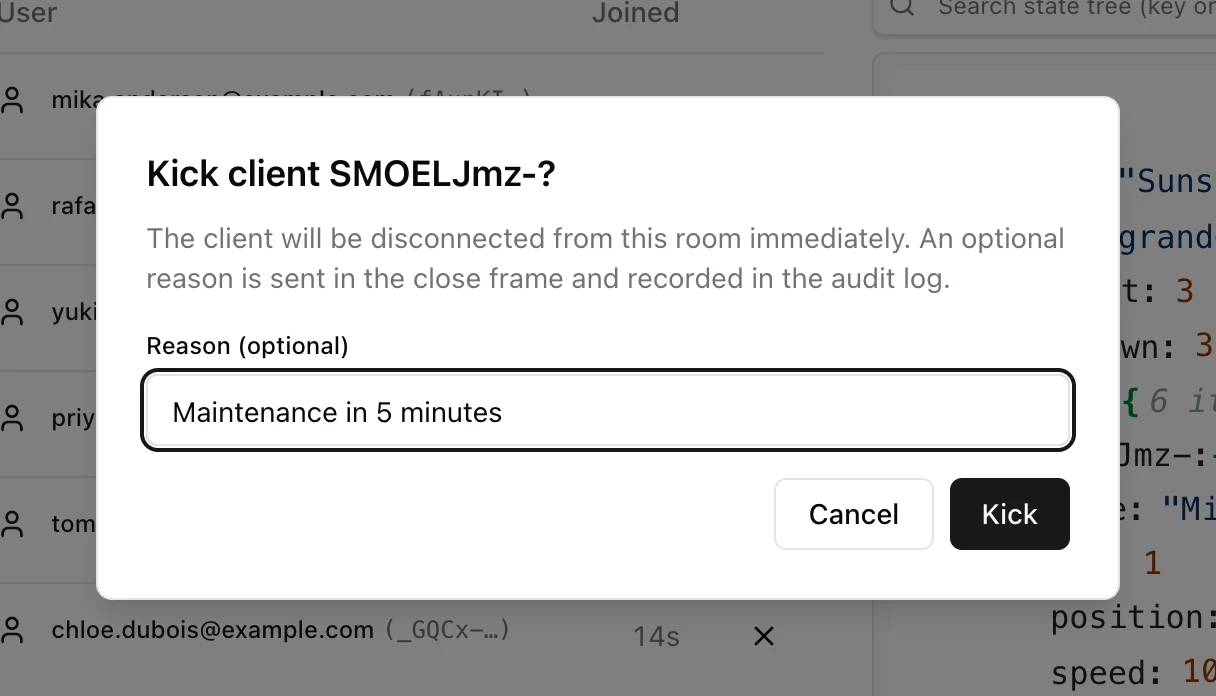
Records action: "room.kick" with payload { sessionId, reason }.
Lock / unlock
Toggle the room’s locked flag through Room#lock() / Room#unlock(). Locked rooms are skipped by the matchmaker and joinById fails on them. Locking is useful for draining a room (let current clients finish; no new joins) or holding it for a private match.
Records action: "room.lock" or "room.unlock".
Edit state
The detail page renders the room’s state tree as JSON. Click a leaf value to change it in place, or remove an entry from a map or array. Edits are applied to the live Schema instance inside the room process, so they reach every connected client on the next patch. The editor is deliberately narrow. You can change leaf values and delete entries; you cannot add keys, change a value’s type, or replace a whole object. Direct edits are useful for adjusting in-flight match state (revert a bug, grant a permission, set a flag) without a server restart.
State edits are immediate and broadcast to all connected clients. A path that does not resolve is a silent no-op: the request still answers 200 and writes an audit row. Use sparingly and prefer adding a dedicated custom action for repeatable workflows (see Resources → Custom actions).
Records action: "room.state.edit" with { path, value }, or action: "room.state.delete" with { path }. path is the array of keys from the root, for example ["racers", "T6eCaDKmv", "lap"].
Force-dispose
Terminate a room immediately, regardless of its current state. The panel calls Room#disconnect() and returns without waiting for it, so the 200 arrives before the clients have actually closed. All clients are disconnected with CloseCode.CONSENTED; the room is removed from the matchmaker when its onDispose finishes.
Records action: "room.dispose", also when the room was already gone.
REST endpoints
| Method | Path | Body | Gate | Audit action |
|---|---|---|---|---|
GET | /admin-api/rooms | — | list | — |
GET | /admin-api/rooms/:roomId | — | read | — |
GET | /admin-api/rooms/by-user/:userId | — | read | — |
DELETE | /admin-api/rooms/:roomId/clients/:sessionId | { reason? } | update | room.kick |
PATCH | /admin-api/rooms/:roomId | { locked: boolean } | update | room.lock / room.unlock |
PATCH | /admin-api/rooms/:roomId/state | { path, value } | update | room.state.edit |
DELETE | /admin-api/rooms/:roomId/state | { path } | update | room.state.delete |
DELETE | /admin-api/rooms/:roomId | — | delete | room.dispose |
by-user lists the rooms a user is currently connected to ({ roomId, roomName, sessionId, joinedAt, processId }, newest first) and powers the Active sessions tab on the user’s show page. It reads the index that TrackUserSessionsPlugin maintains, so rooms without that plugin never appear there. A room that is not reachable answers 404.
# lock a room, then kick one client with a reason
curl -b cookies.txt -X PATCH http://localhost:2567/admin-api/rooms/QcxWRrptI \
     -H 'content-type: application/json' -d '{"locked":true}'
curl -b cookies.txt -X DELETE http://localhost:2567/admin-api/rooms/QcxWRrptI/clients/T6eCaDKmv \
     -H 'content-type: application/json' -d '{"reason":"Maintenance in 5 minutes"}'
Multi-process visibility
Listing comes from matchMaker.query(), so the table shows whatever the matchmaker driver knows. Every other call (inspect, kick, lock, state edits, dispose) goes through matchMaker.remoteRoomCall(), which reaches rooms on other processes over the presence layer. Both have to be shared for the inspector to work across a cluster:
| Driver | Presence | Result |
|---|---|---|
LocalDriver (default) | LocalPresence (default) | Only rooms on the current process. Fine for development. |
RedisDriver, PostgresDriver, MongooseDriver, or DatabaseDriver from @colyseus/database | LocalPresence | Every room is listed, but rooms on other processes answer 404 on the detail page and every action times out. |
| Any shared driver | RedisPresence | All rooms across all processes, fully operable. Recommended for production. |
If you don’t see rooms you expect, confirm the driver is shared across processes. If you see them but can’t open them, confirm the presence is shared too.
RBAC
The inspector uses a synthetic rooms resource for the standard role rules:
- Admin: full read + all actions.
- Mod: no access without the
roomsscope. Assign withdb.moderation.assignMod(userId, "rooms"). Scoped mods get read plus kick, lock and state edits. Dispose stays admin-only (it maps to thedeleteaction, which mods never have). - User: cannot open the panel UI (403), but the list and inspect endpoints still answer.
The user role passes the list and read gates. Any registered player who can sign in at /admin-api/auth/login can therefore open every room. The answer includes live state, metadata, and the emails of the connected clients. See Authentication → Roles for the mitigation until the package closes this.
Next steps
- Resources & CRUD: custom actions, policies, and the audit log.
- Authentication & RBAC: sessions and role assignment.
- Server → Driver and Server → Presence: the two pieces that decide cluster-wide visibility.