Admin Panel
@colyseus/admin is a browser-based operations console for projects using @colyseus/database. The panel provides user management (browse, ban, revoke sessions), CRUD over your drizzle tables, a live room inspector, and a customizable dashboard. Everything is gated by session-based login with role-based access control and an append-only audit log.
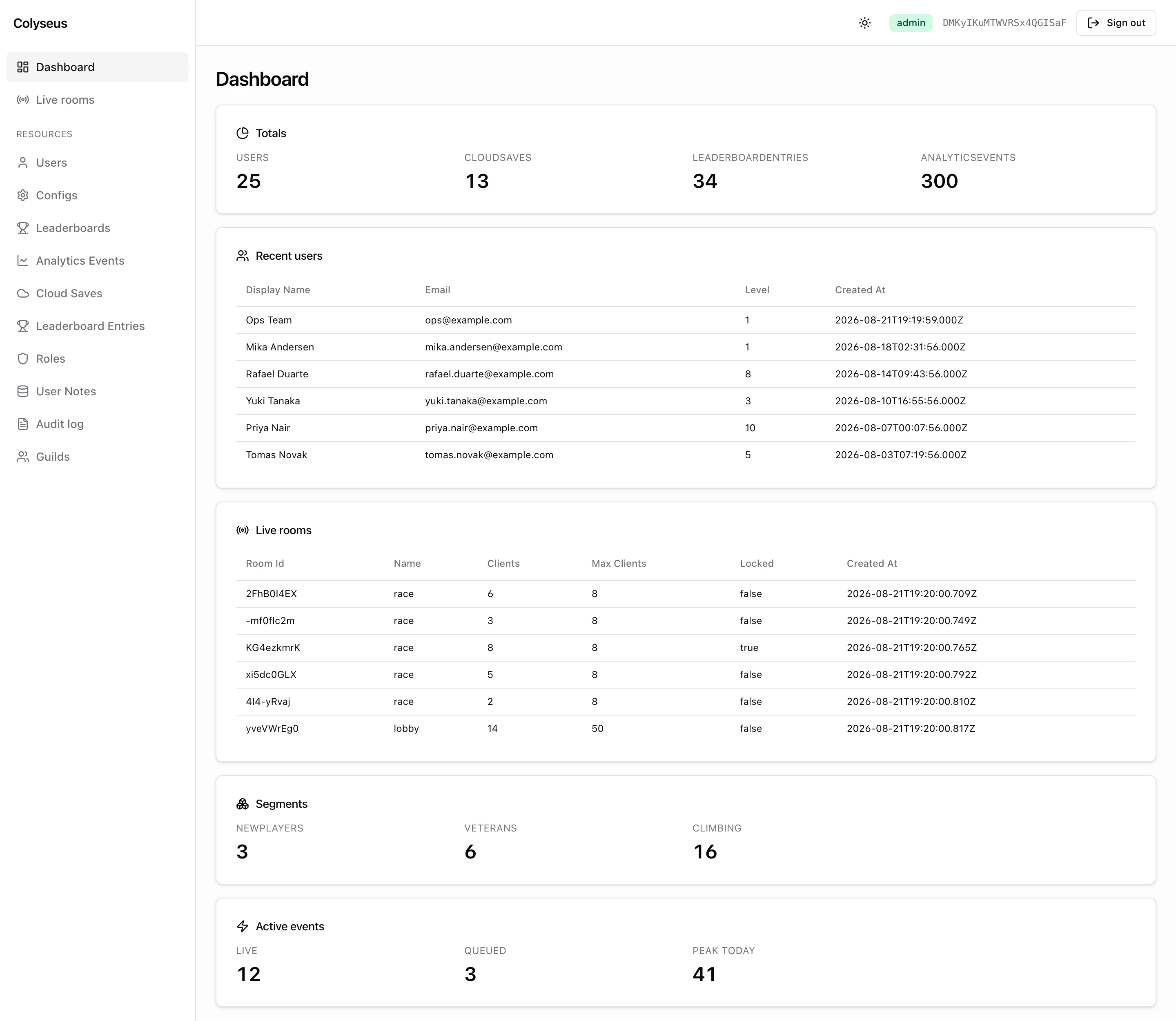
For a lightweight, no-auth dashboard intended for room and process inspection, see the Monitoring Panel instead. The admin panel is the heavier counterpart, built for production operations.
@colyseus/admin is in beta: APIs may change between releases as we incorporate community feedback. Share yours on the public roadmap.
Installation
On top of @colyseus/core, the panel has two peer dependencies: @colyseus/database (user store, audit log, drizzle table introspection) and @colyseus/auth (JWT signing, password hashing). Install all three together:
npm install --save @colyseus/admin @colyseus/database @colyseus/authMounting
The admin panel mounts in two ways:
Spread admin({}) into createRouter. The factory returns both the SPA static-serving routes and the REST API in one map:
import { defineServer, createRouter } from "colyseus";
import { GameDatabase } from "@colyseus/database";
import { admin } from "@colyseus/admin";

export const db = new GameDatabase({ connectionString: process.env.DATABASE_URL });

export default defineServer({
    database: db,
    routes: createRouter({
        ...admin({}),
    }),
});The database option defaults to GameDatabase.current, set automatically when you construct new GameDatabase(...). Multi-database deployments should pass database explicitly (e.g. admin({ database: db })) to disambiguate which instance the panel drives. admin() throws at startup when neither is available.
Usage
Once mounted, start your server and open http://localhost:2567/admin/ in your browser (the bare /admin redirects to the trailing slash). If you customized uiPath, adjust the URL accordingly.
The REST API mounts in parallel at http://localhost:2567/admin-api and is consumed by the SPA. Every endpoint enforces the same session and role rules as the UI, so you can script the panel with curl or fetch using the session cookie. The sub-pages list the endpoints for each area. GET /admin-api/_health is the one unauthenticated route: it answers 200 { ok, db, latencyMs } or 503 when the database is unreachable, for readiness probes.
First-run bootstrap
The admin panel includes no built-in admin user. The SPA calls GET /admin-api/auth/status on load; while no user has the admin role it reports needsBootstrap: true and the panel renders a one-time setup form.
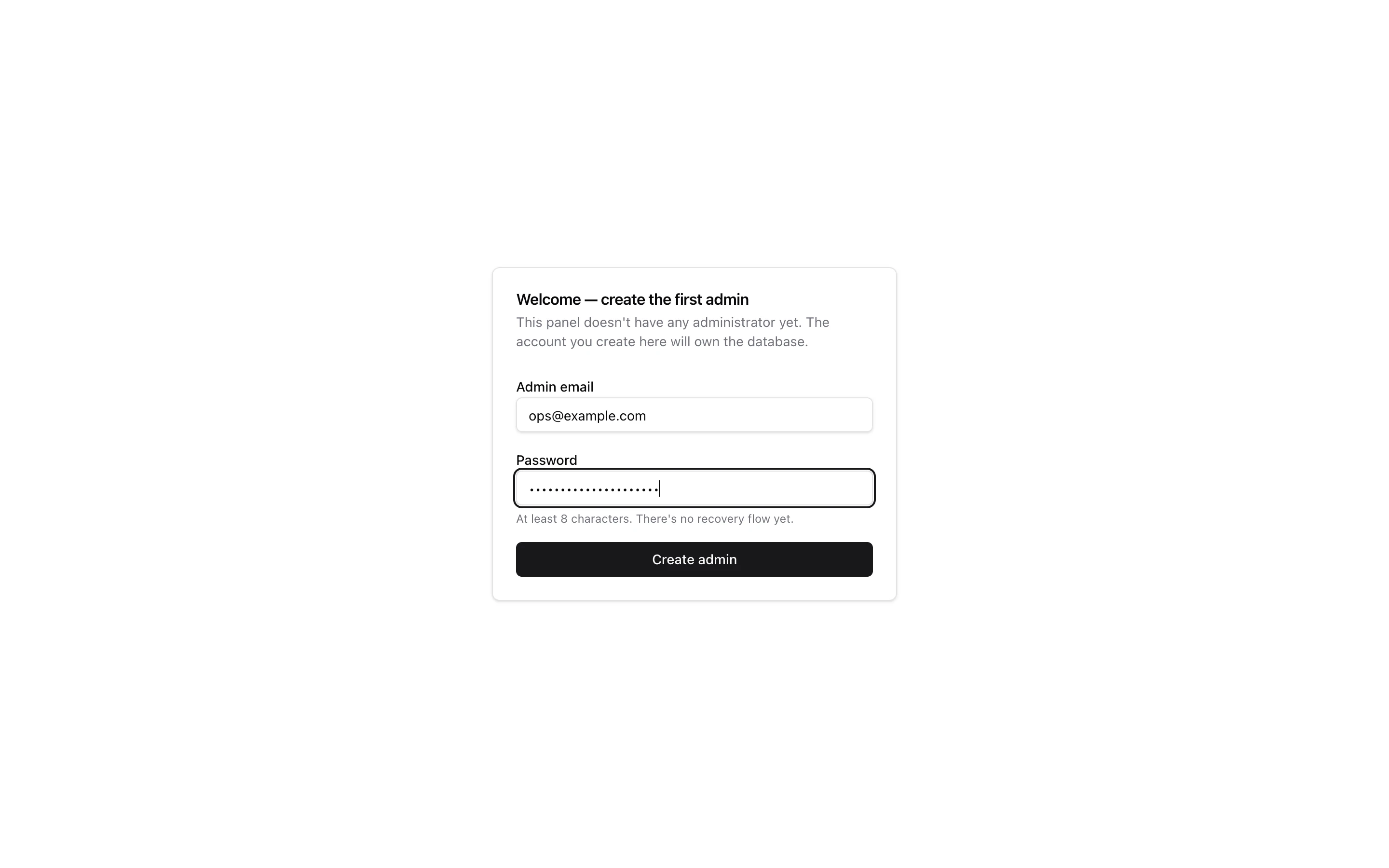
Submitting the form calls POST /admin-api/auth/bootstrap with { email, password }. If a user with that email already exists (for example, you registered through your game first), that account is promoted instead of created. After bootstrap:
- A session cookie is set (HttpOnly, SameSite=Strict, JWT-signed).
- You’re redirected into the panel with full
adminrole access. - All sibling routes gated with
admin.guard()(e.g. the Playground or Monitor) now resolve against the same session. - The endpoint refuses further calls with
403as soon as one admin exists.
See Authentication & RBAC for the full session, role, and revocation story.
Hardening for production
The defaults are tuned for local development. Before exposing the panel to the public internet:
-
Set a strong
JWT_SECRETandSESSION_SECRET: see Auth Module → Required Environment Secrets. WithNODE_ENV=production,admin()throws at startup when no JWT secret is configured; outside production it only warns. RotatingJWT_SECRETinvalidates all admin sessions (SESSION_SECRETonly signs OAuth state cookies). -
Keep player accounts out of the panel.
POST /admin-api/auth/loginaccepts any user row with a password. Theuserrole then passes the list/read gate on every resource and on the room inspector. A player with an email and password can therefore read live room state and other players’ emails through the API. Until the package closes this, serve the panel on a separate hostname or behind your own network guard. Keeping admin accounts in a dedicated database also works. See Authentication → Roles. -
Wire
auth.settings.onForgotPasswordso password reset links reach your admins. The panel ships no reset page yet; see Password reset for the API flow. -
Tighten the session cookie via the
sessionoption: set an explicitcookieDomain, an appropriatettlSeconds, and confirm thecookieSecure/cookieSameSitevalues match your deployment. -
Disable
allowDevHeaderif you don’t need it. It auto-disables whenNODE_ENV === "production", but setting it tofalseexplicitly avoids surprises in mixed environments. -
Swap the in-memory rate limiters for a Redis-backed implementation on multi-process deployments. The default token buckets don’t share state across instances. The limiter keys on
X-Forwarded-For/X-Real-IPwhen present, so only expose the panel behind a proxy that overwrites those headers. -
Gate the Monitor and Playground behind
admin.guard()so you don’t have multiple unauthenticated panels exposed:src/app.config.tsroutes: createRouter({ ...playground({ use: [admin.guard()] }), ...monitor({ use: [admin.guard()] }), ...admin({}), }),
enforceRbac: false removes every identity check: any anonymous request can create, update, delete, kick, dispose and ban, and audit rows are written without an operatorId. Use it only on a local database.
Options reference
admin(options) accepts the following AdminOptions:
| Option | Type | Default | Description |
|---|---|---|---|
database | GameDatabase | GameDatabase.current | The database powering the user store, audit log, and table introspection. Pass explicitly for multi-database setups. |
tables | Record<string, Table> | database.tables | Map of drizzle tables exposed in the panel. Custom tables must be added here: { ...db.tables, guilds }. See Resources & CRUD. |
resources | Record<string, ResourceDefinition> | built-in defaults | Per-table UI/UX overrides: labels, visible columns, form fields, actions, policies. The audit log and user notes get built-in definitions unless you override them. See Resources & CRUD. |
uiPath | string | "/admin" | Mount path for the admin SPA. Ignored under an Express path mount, where the mount path wins. |
apiPath | string | "/admin-api" | Mount path for the admin REST API. Nested inside the mount under an Express path mount. |
uiDistDir | string | built-in | Absolute path to the built UI assets. Defaults to the bundled build/ directory inside the package. |
session | SessionConfig | see below | Cookie config: ttlSeconds, cookieDomain, cookieSameSite, cookieSecure. |
resolveUserId | (ctx: { getHeader }) => string | undefined | Promise<…> | session cookie, then X-User-Id in dev | Replace the identity resolver to integrate another auth scheme. Your function receives only getHeader(name). The default also rejects sessions whose tokenVersion was bumped; a replacement has to repeat that check. |
enforceRbac | boolean | true | Set to false to skip every identity and role check (local development only, see the warning above). |
allowDevHeader | boolean | true in dev, false in prod | Permit X-User-Id: <id> as a fallback identity for curl/puppeteer testing. |
minPasswordLength | number | 8 | Minimum password length accepted by the bootstrap and reset endpoints. Plain length check, no complexity rules. |
onResetRequest | (ctx) => void | Promise<void> | forwards to auth.settings.onForgotPassword, else logs the link | Deliver the password reset link. Receives { email, userId, token, url }; url is a site-relative path. See Password reset. |
rateLimit | { login, bootstrap, requestReset } | in-memory token buckets | Per-endpoint rate limiters. Pass false per slot to disable, or a custom RateLimiter to swap in a Redis-backed implementation. |
dashboard | { presets, widgets } | all presets enabled | Configure the dashboard homepage. See Dashboard & widgets. |
logger | Logger | null | JSON to stdout / stderr | Pino-compatible logger (info, warn, error, child). warn and error go to stderr; debug only prints with LOG_DEBUG=1. Pass null to silence the panel’s internal logs. |
Session defaults
The session config controls the JWT cookie. Defaults:
session: {
    ttlSeconds: 7 * 24 * 60 * 60, // 1 week
    cookieSameSite: "Strict",
    cookieSecure: process.env.NODE_ENV === "production",
    // cookieDomain: undefined  ← host-only; set explicitly when serving from a subdomain
}
The cookie is always HttpOnly, scoped to Path=/, and signed with JWT_SECRET. Revoking a session is done via db.auth.bumpTokenVersion(userId). See Database → Authentication.
Next steps
- Authentication & RBAC: sessions, roles, password reset, and
admin.guard(). - Resources & CRUD: exposing custom tables, customizing columns and forms, custom actions, the audit log.
- Dashboard & widgets: configuring presets and appending custom widgets to the homepage.
- Live rooms: the built-in room inspector.