Resources & CRUD
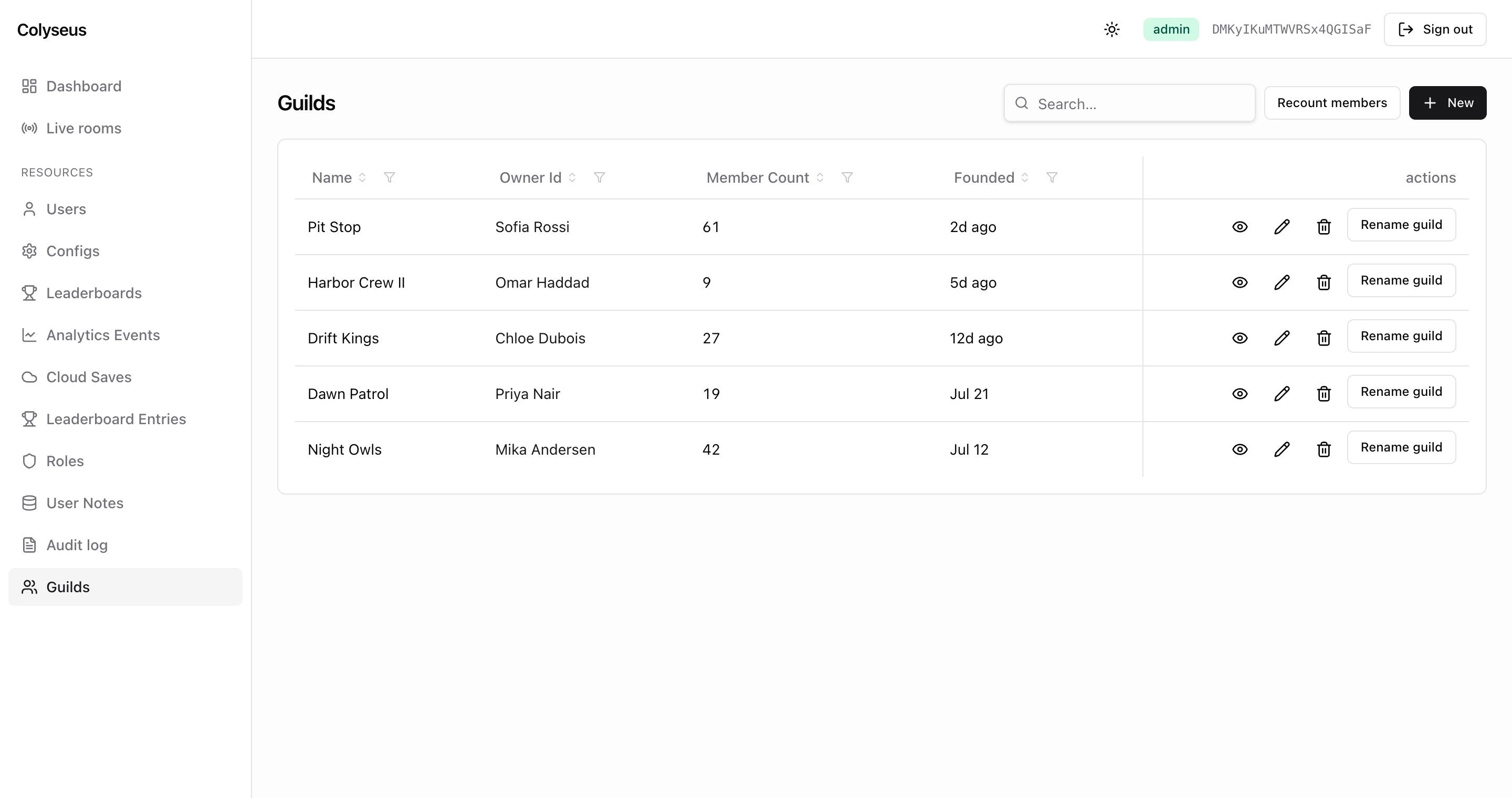
Every drizzle table you pass to the admin panel becomes a browse-able resource with a full CRUD UI. The UI includes a paginated list with search, filter and sort. It adds a detail view with related rows, create and edit forms, and per-row custom actions. The built-in tables from @colyseus/database are registered automatically. You customize them, and add your own, with the tables and resources options.
Built-in resources
The built-in tables, in sidebar order:
| Resource | Key | Source table | Notes |
|---|---|---|---|
| Users | users | colyseus_users | Detail page adds ban, unban and revoke-sessions buttons, plus an Active sessions tab (needs TrackUserSessionsPlugin). |
| Configs | configs | colyseus_configs | — |
| Leaderboards | leaderboards | colyseus_leaderboards | — |
| Analytics Events | analyticsEvents | colyseus_analytics_events | — |
| Cloud Saves | cloudSaves | colyseus_cloud_saves | — |
| Leaderboard Entries | leaderboardEntries | colyseus_leaderboard_entries | — |
| Roles | roles | colyseus_roles | Blocked for mods by the core role rule itself (not a policy). Modifying it would bypass the role system. |
| User Notes | userNotes | colyseus_user_notes | author_id auto-filled from the session on create. |
| Audit log | adminAudit | colyseus_admin_audit | Admin-only reads; every write denied, including for admins (append-only contract). |
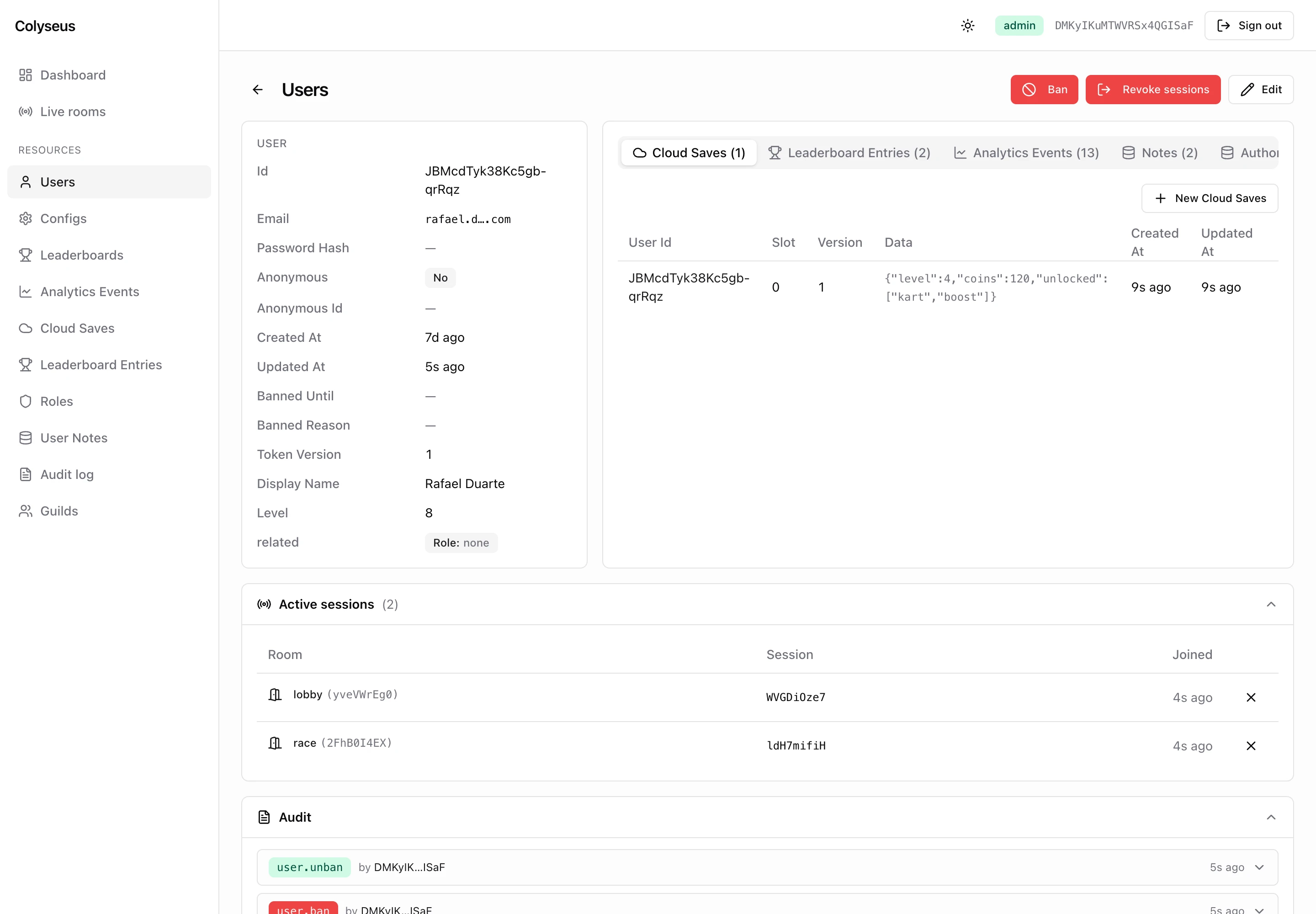
The label derives from the key unless a definition overrides it. The key is what you use everywhere else: in URLs (/admin/cloudSaves, /admin-api/cloudSaves), in db.moderation.assignMod(userId, "cloudSaves"), and as the resource value in audit rows.
Unless a table declares its own policies, access follows the standard role rule. Only the audit log declares policies by default.
- admin: full CRUD.
- mod: list, read, and update, only on resources they’re scoped to.
- user: cannot open the panel UI (403). Direct API calls to list and read endpoints still succeed.
Exposing a custom table
Two options work together. tables decides which drizzle tables exist in the panel; resources decides how each one looks and behaves. A custom table needs both: a resources entry alone is stored but never listed, and /admin-api/guilds answers 404.
import { admin, defineAdminResource } from "@colyseus/admin";
import { guilds } from "./db/schema";

routes: createRouter({
    ...admin({
        tables: { ...db.tables, guilds },                 // what exists
        resources: { guilds: defineAdminResource(guilds, { label: "Guilds" }) }, // how it looks
    }),
}),
db.tables holds the built-in tables keyed by their canonical names. The key you pick for a custom table (guilds) becomes its URL segment and its scope name for mods. A custom table with no resources entry still works: you get the humanized label, a default icon picked from the table name, and all columns.
GameDatabase only creates its own tables at boot. Create custom tables with your migrations (see Database → Schemas) before pointing the panel at them.
Customizing a resource
Override the defaults of any table, built-in or custom, by passing defineAdminResource(table, config) into resources:
import { admin, defineAdminResource } from "@colyseus/admin";
import { guilds } from "./db/schema";

const guildResource = defineAdminResource(guilds, {
    label: "Guilds",
    icon: "safety",
    list: {
        columns: ["name", "owner_id", "member_count", "created_at"],
        defaultSort: { field: "created_at", order: "desc" },
    },
    form: {
        fields: ["name", "description", "owner_id"],
    },
    columns: {
        created_at: { label: "Founded" },
    },
    actions: [{
        name: "rename",
        label: "Rename guild",
        perRow: true,
        confirm: { title: "Rename this guild?" },
        handler: async (row, { userId }) => {
            // ...rename logic
            return { renamedBy: userId };
        },
        roles: ["admin", "mod"],
    }],
    policies: {
        delete: ["admin"], // admin-only deletion
    },
});

routes: createRouter({
    ...admin({
        database: db,
        tables: { ...db.tables, guilds },
        resources: { guilds: guildResource },
    }),
}),Column lists (list.columns, form.fields, show.fields) and the keys of columns are SQL column names (owner_id), not drizzle property names (ownerId). A property name matches nothing and is dropped without an error.
Configuration reference
defineAdminResource(table, {
    label,        // sidebar/page title; defaults to the humanized key
    icon,         // sidebar icon from the built-in icon set (see below)
    list:    { columns, defaultSort },
    form:    { fields },
    show:    { fields },
    create:  { defaults },
    columns: { <sqlColumn>: { label, linkTo } },
    relations: { <relName>: { label } },
    actions: [ /* ResourceAction[] */ ],
    policies: { list, read, create, update, delete },
})| Section | Field | Description |
|---|---|---|
list | columns | Columns shown in the list view, in order. Primary keys are always included. Omit to show all. |
defaultSort | { field, order: 'asc' | 'desc' } applied when no _sort is requested. Useful for append-only tables. | |
form | fields | Columns shown in the create and edit forms. The create form additionally hides primary keys and columns with a database default, even when listed here. Omit to show all. |
show | fields | Columns shown on the read-only detail page. |
create | defaults | (ctx) => Record<string, any> | Promise<…>: server-side defaults merged into the body before INSERT. Receives { operatorId, resource }. The request body wins on conflict. |
columns | <col>.label | Override the auto-humanized column label. |
<col>.linkTo | Decorate the cell as a link to another resource’s show page. Static: { resource: "users" }; for the dynamic form, see FK auto-linking. | |
relations | <rel>.label | Override the auto-humanized relation tab label. |
actions | ResourceAction[] | Custom per-row or bulk operations. See below. |
policies | list | read | create | update | delete | Per-action RBAC. See Policies. |
Every column header in the list view sorts on click; there is no per-column opt-in.
Server-side defaults on create
The create.defaults function runs on every INSERT with the operator in scope. Use it to auto-fill audit fields like author_id or created_by from the session.
create: {
    defaults: ({ operatorId }) => ({ authorId: operatorId }),
}
Keys can be either SQL column names (author_id) or drizzle property names (authorId). Both forms are normalized. The request body wins on conflict, matching how SQL DEFAULTs behave per-column. operatorId is undefined when enforceRbac is off.
Custom actions
Custom actions are operations beyond create/update/delete: things like “reset a player’s level”, “refund a transaction”, “rename a guild”. They appear as buttons on the resource’s list page: a toolbar button for bulk actions, a per-row menu for row actions. The detail page shows none. Each click resolves to a POST request:
POST /admin-api/:resource/_action/:namePer-row actions
Set perRow: true to make the action operate on a specific row. The panel sends { id } and the handler receives the row data:
actions: [{
    name: "reset_progress",
    label: "Reset progress",
    perRow: true,
    confirm: {
        title: "Reset this player's progress?",
        description: "This clears all cloud saves and resets the user's level to 1.",
    },
    handler: async (row, { userId, resource }) => {
        await db.saves.delete(row.id);
        await db.drizzle.update(users).set({ level: 1 }).where(eq(users.id, row.id));
        return { ok: true };
    },
    roles: ["admin"],
}]
The endpoint answers { ok: true, result } with the handler’s return value, JSON-serialized. The panel itself shows a generic success toast and only displays the body on failure. The return value is for API callers and the audit log.
Bulk actions
Omit perRow for actions that operate on the table at large (e.g. “reseed leaderboard”, “purge old entries”). The panel sends {} and the handler receives null for the row argument.
Confirmation prompts
confirm is optional but recommended for destructive or expensive operations. Without it the panel still asks Run "<label>"? before sending:
confirm: {
    title: "Refund this transaction?",
    description: "The amount will be credited back to the user's wallet.",
}
Audit logging
Custom action invocations are recorded with action: "custom", the row id as target_id, and payload: { name, args, result }, where args is the full request body. Avoid passing secrets through action bodies. See Audit log below.
Policies
Per-resource RBAC overrides the role + scope defaults. policies is keyed by action (list, read, create, update, delete) with values:
| Value | Meaning |
|---|---|
['admin'] | Only admins (full role) can perform this action. |
['admin', 'mod'] | Admins or any mod, regardless of resource scope assignment. |
'everyone' | Any signed-in identity, whatever its role (including user). Anonymous requests still get 401. |
'deny' | Blocked entirely, even for admins. Useful for read-only resources like the audit log. |
policies: {
    delete: ["admin"],         // admin-only deletion
    create: ["admin", "mod"],  // mods can create, regardless of scope
    update: "deny",            // table is read-only
}
A policy set for an action replaces the standard RBAC rule for that action on that resource. The policy is not layered on top. Only actions with no policy fall back to the standard db.moderation.can(userId, action, resource) rule.
Custom action policies
Custom actions have their own roles field. Policies do not apply to them, and neither does the mod scope check:
actions: [{
    name: "rename",
    handler: ...,
    roles: ["admin", "mod"],  // restrict to admins + mods
}]A non-empty roles list is checked literally and never includes admins implicitly, so always list the admin role. Omitting roles, or passing [], skips the role check entirely. Any signed-in identity can then invoke the action, even a plain user who cannot open the panel. The action also bypasses an update: "deny" policy on the resource. Give every action an explicit roles list. To remove an action, omit it from the resource definition instead.
FK auto-linking
The panel reads database.relations to decorate foreign-key columns. Relations between the built-in tables are declared for you. A user_id column on cloudSaves becomes a clickable link to the user’s show page automatically. The cell shows the user’s display_name, name, email or title instead of the raw id. Declare relations for your own tables on the GameDatabase constructor, using drizzle property names for fk:
export const db = new GameDatabase({
    connectionString: process.env.DATABASE_URL,
    schemas: schema,
    relations: {
        guilds: [{ name: "owner", target: "users", kind: "one", fk: "ownerId" }],
        users:  [{ name: "ownedGuilds", target: "guilds", kind: "many", fk: "ownerId" }],
    },
});
The one relation turns owner_id into a labelled link on every guilds row; the many relation adds an “Owned guilds” tab to each user’s detail page. Composite-key targets are skipped.
A static columns.<col>.linkTo: { resource } override also renders a link, but only a link: the cell keeps the raw value. For columns whose target varies per row, use the dynamic form. The built-in audit log definition does this for target_id, which references a different table on every row:
columns: {
    target_id: {
        label: "Target",
        linkTo: { resourceFromColumn: "resource" },
        // value of `resource` on the same row picks the link target
    },
}
Icons
The icon field accepts the names of icons from the panel’s built-in icon set. Types are surfaced as the AdminIconName union. Common picks: user, team, safety, trophy, file-text, setting, line-chart, database, thunderbolt. See ADMIN_ICON_NAMES in @colyseus/admin for the full list. When icon is omitted the panel guesses one from the table name (*_users → user, *_scores → trophy, and so on) and falls back to database.
REST endpoints
The SPA is a thin client over these routes. :resource is the canonical key and :id the primary key value. Composite keys are addressed with a base64url-encoded JSON array of the key values, in table order.
| Method | Path | Gate | Audit action |
|---|---|---|---|
GET | /admin-api | operator (admin or mod) | — |
GET | /admin-api/:resource | list | — |
GET | /admin-api/:resource/:id | read | — |
POST | /admin-api/:resource | create | create |
PATCH or PUT | /admin-api/:resource/:id | update | update |
DELETE | /admin-api/:resource/:id | delete | delete |
POST | /admin-api/:resource/_action/:name | action roles | custom |
GET | /admin-api/:resource/:id/_counts | read | — |
GET | /admin-api/:resource/:id/relations/:name | read on both tables | — |
POST | /admin-api/users/:id/ban | update on users | user.ban |
POST | /admin-api/users/:id/unban | update on users | user.unban |
POST | /admin-api/users/:id/revoke-sessions | update on users | user.revoke_sessions |
GET /admin-api returns the catalog: every resource with its columns, relations and actions. Request and response bodies use SQL column names.
The list endpoint follows the @refinedev/simple-rest query contract:
| Query | Effect |
|---|---|
_start, _end | Row window (default 0–100). The response carries x-total-count. |
_sort, _order | Column name and asc / desc. Falls back to the resource’s defaultSort. |
_q | Substring match across the text columns. |
<col>_like, <col>_eq, <col>_ne, <col>_gt, <col>_gte, <col>_lt, <col>_lte, <col>_in | Per-column filters. _in takes a comma-separated list. |
curl -b cookies.txt "http://localhost:2567/admin-api/guilds?_sort=member_count&_order=desc&_start=0&_end=20&name_like=night"ban takes an optional { reason, until }; the reason is capped at 500 characters. All three user endpoints also close the user’s live WebSocket sessions and answer 501 when your users table lacks the ban or token_version columns.
Audit log
Every mutation from the panel is recorded to the append-only colyseus_admin_audit table. The log covers CRUD (create, update, delete), ban / unban / session-revoke, custom-action invocations, live-room mutations (kick, lock, unlock, state edit, state delete, dispose) and auth events (auth.login, auth.login_failed, auth.logout, auth.bootstrap, auth.password_reset_requested, auth.password_reset_completed). Each entry stores:
created_at: when it happenedoperator_id: which admin did it (nullfor failed logins against unknown emails)action:create/update/delete/custom/user.ban/room.kick/ etc. (fullAuditActionunion in@colyseus/database)resource: the canonical key (users,guilds,rooms,auth)target_id: the affected row idpayload: action-specific JSON
| Action | payload |
|---|---|
create | { row } |
update | { changes: { <column>: { before, after } } }, changed columns only |
delete | { row } |
custom | { name, args, result } |
user.ban | { reason, until, sessionsClosed, ip, userAgent } |
room.* | action fields plus ip and userAgent, see Live rooms |
auth.* | { email?, ip, userAgent } |
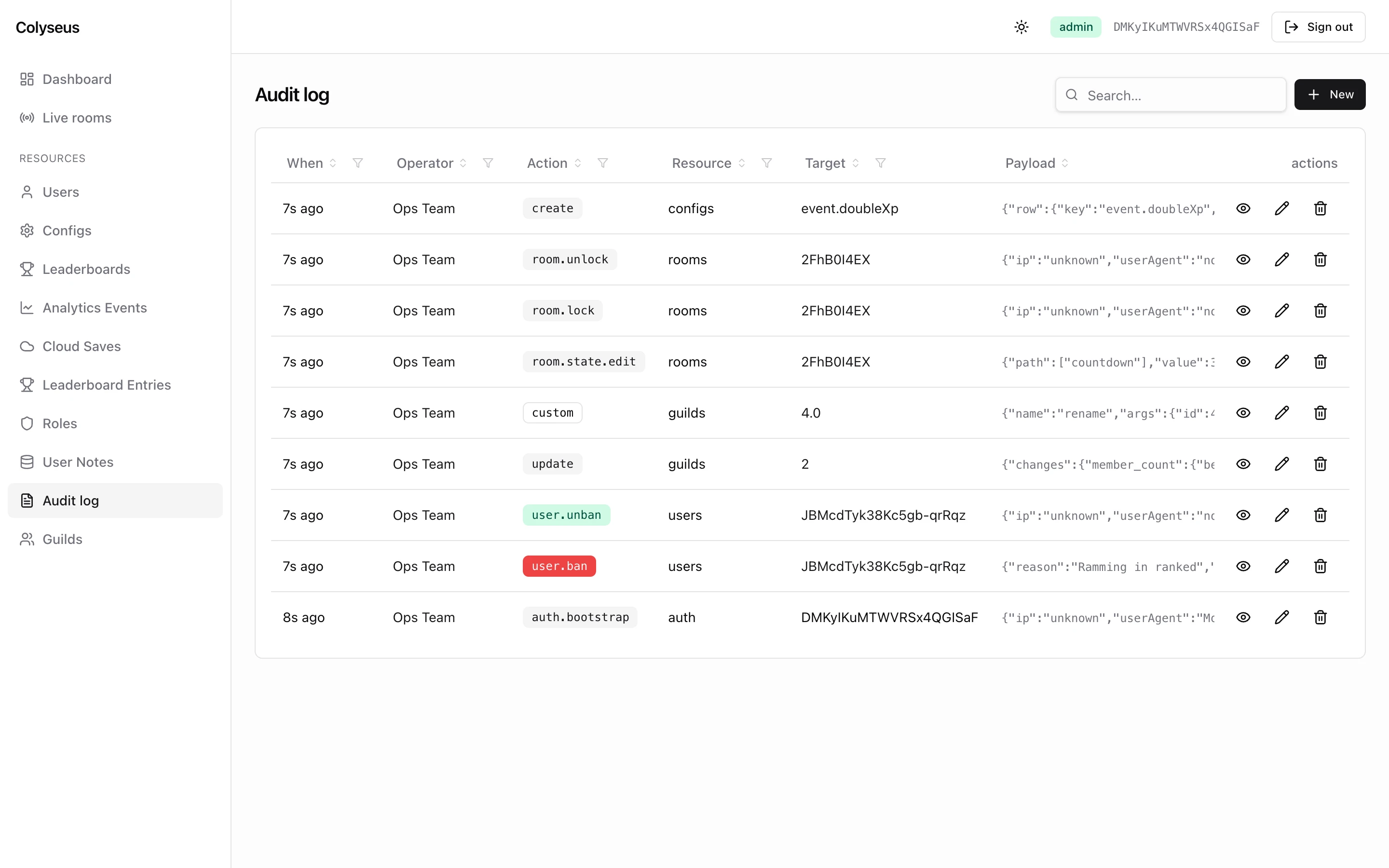
Browse the log inside the panel under the Audit log resource. Reads are admin-only (list: ['admin'], read: ['admin']) because payloads can contain before/after row data, and writes from the panel are denied for everyone via policies: { create: 'deny', update: 'deny', delete: 'deny' }. Prune old rows out-of-band with db.audit.prune(before).
Recording from your own code
If your own tooling mutates the DB outside the panel (e.g. a custom HTTP endpoint), record audit entries the same way the panel does:
await db.audit.record({
    operatorId,
    action: "custom",
    resource: "users",
    targetId: userId,
    payload: { reason: "VIP grant", before: { vip: false }, after: { vip: true } },
});
For updates where you want a structured diff, use recordUpdate(). It stores a column-level diff of the changed fields (not both full rows):
await db.audit.recordUpdate({
    operatorId,
    resource: "users",
    targetId: userId,
    before: oldRow,
    after: newRow,
});
The panel’s own endpoints log audit-write failures without propagating them, so a failed audit write never blocks a successful mutation. A direct db.audit.record() call from your own code throws on failure instead. Wrap it yourself if you want the same behavior.
Next steps
- Dashboard & widgets: extend the panel homepage with custom KPI/table/list widgets.
- Live rooms: the built-in room inspector.
- Authentication & RBAC: the role + scope layer that policies refine.