Continuous Deployment
Colyseus Cloud can deploy your server every time you push to GitHub. You connect your repository once, and each push to the selected branch deploys to all your regions.
Deploying from GitHub
- Open your application’s Settings, then the Build & deploy tab.
- Under Deploy from GitHub, click Connect GitHub.
- Install the Colyseus Cloud GitHub App on your repository.
- Pick the repository and the branch to deploy.
- Click Connect and deploy.
From then on, every push to that branch deploys your server.
Choosing which pushes deploy
A repository often holds more than the server: a frontend, docs, art. A push that only changes those doesn’t need a deploy. The Root directory and Watch paths settings, in the Build settings card of the same tab, decide which pushes deploy.
Watch paths only filter pushes from GitHub. A deploy you start from the CLI or from the panel always runs.
Root directory
The Root directory is the folder that holds your server’s package.json and ecosystem.config.js. When it is a subfolder, such as server/, only pushes that change a file inside it deploy.
Watch paths
Watch paths add more paths that trigger a deploy, one per line. Use them when your server depends on files outside its root directory, such as a folder shared with your frontend:
shared/**
package.json
With the root directory server/, a push deploys when it changes a file in server/ or shared/, or the package.json at the repository root.
Paths are relative to the repository root, not to the root directory. Each line can be:
| Pattern | Matches |
|---|---|
shared/** or shared/ | Every file in shared/ and its subfolders. |
package.json | That file. When the path is a folder, every file inside it. |
*.proto | Every .proto file, in any folder. * also matches /. |
Excluding paths
Start a line with ! to leave a path out. A push that only changes files you left out doesn’t deploy.
Exclusions are the way to filter pushes when the root directory must stay /. A pnpm or npm workspace is the common case, because the lockfile and ecosystem.config.js sit at the repository root:
!apps/client/**
!docs/**
With the root directory /, these lines skip a push that only changes the frontend or the docs. A push that changes apps/server/, packages/ or the lockfile still deploys, even when it also changes the frontend.
While the root directory is /, every file is watched already. So a line without ! only matters after an exclusion, to bring part of it back.
Order of lines
The root directory counts as the first line. When several lines match a file, the last one decides:
!apps/**
apps/server/**
Here a change in apps/server/ deploys, and a change anywhere else in apps/ doesn’t. In the opposite order, !apps/** would leave out apps/server/ too.
Using GitHub Actions
Deploying from GitHub needs no workflow. Use GitHub Actions when a step must run before the deploy, such as your tests.
When you make your first deployment from your development environment to the Colyseus Cloud, you will receive a .colyseus-cloud.json file. This file contains the applicationId and token that you will use to deploy your server from your CI/CD pipeline.
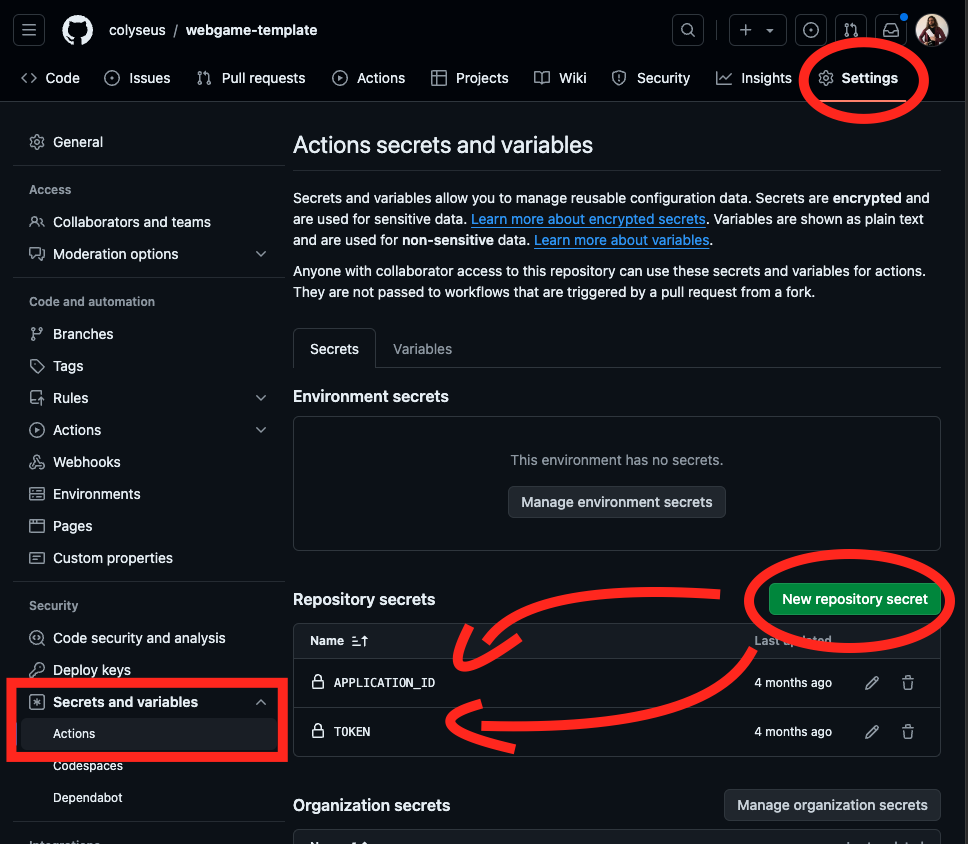
Do not push .colyseus-cloud.json to your repository, as it contains sensitive information. Instead, you can use GitHub Secrets to store this information and use it in your GitHub Actions workflow:
APPLICATION_ID: TheapplicationIdfrom your.colyseus-cloud.jsonfile.TOKEN: Thetokenfrom your.colyseus-cloud.jsonfile.
Example Workflow
Here is an example of a GitHub Actions workflow that deploys your server to the Colyseus Cloud when you push to the main branch.
name: Deploy to Colyseus Cloud

on:
    push:
        branches:
            - main

jobs:
    deploy:
        runs-on: ubuntu-latest
        env:
            applicationId: ${{ secrets.APPLICATION_ID }}
            token: ${{ secrets.TOKEN }}
        steps:
            - uses: actions/checkout@v4
            - name: Use Node.js
              uses: actions/setup-node@v4
              with:
                  node-version: '20.x'
                  registry-url: 'https://registry.npmjs.org'
            - name: Trigger deployment
              run: |
                  npm install -g @colyseus/cloud
                  npx @colyseus/cloud deploy --applicationId $applicationId --token $token