 Construct 3
Construct 3
Installation
The plugin version must match your server’s major version. Plugin 0.18.0.x speaks the Colyseus 0.18 protocol and cannot connect to 0.17 servers.
| Plugin version | Colyseus server version |
|---|---|
0.18.0.x | 0.18.x |
0.17.0.x | 0.17.x |
You need a server to use Colyseus!
Construct has well-known existing features to “host” a multiplayer session from the frontend. This is not possible when using Colyseus. Colyseus is an authoritative server, written in Node.js. You can’t let your frontend host the rooms directly.
Example project
Please explore this demonstration project to understand how to use Colyseus with Construct3.
- Download
.c3pand server files ( View source-code) - Open the
RawUsage.c3pfile on Construct3 Editor ↗. - Start the local server by running
npm installand thennpm starton theserverfolder.
The example project covers the core concepts of using Colyseus with Construct 3:
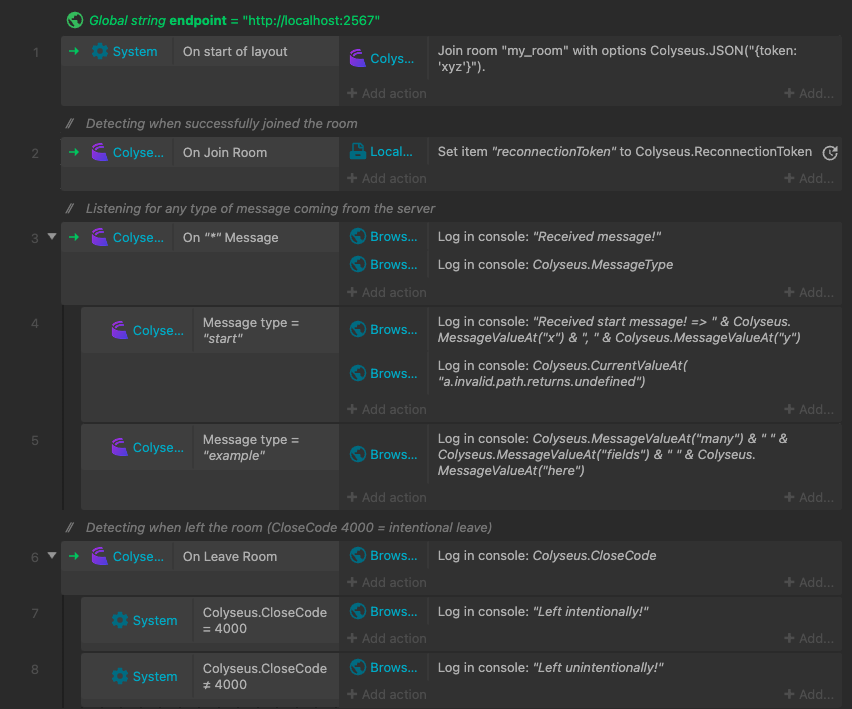
Joining a Room
Use the “Join Room” action to connect to a room on the server. Once connected, you can listen for incoming messages using “On Message” triggers, and handle disconnection with “On Leave”.
Listening for changes in the State
Use “On State Change” to react whenever the server updates the room state. Access individual state properties using the expression syntax to read synchronized values like scores, positions, or game phase.

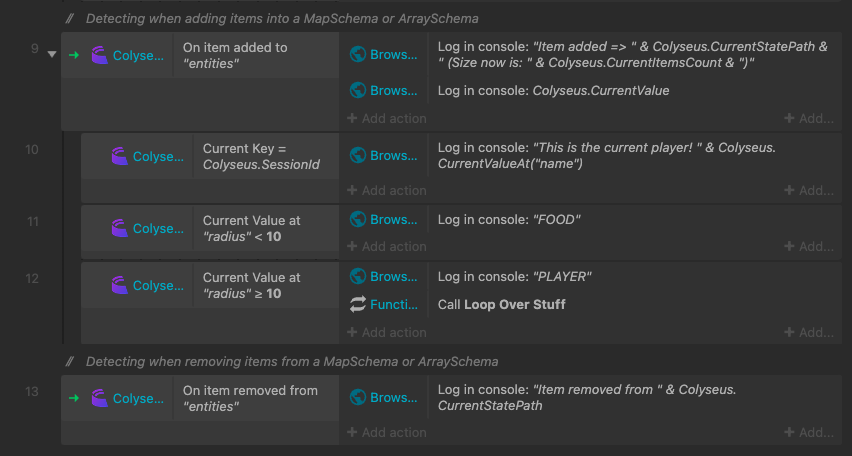
Listening for add/remove events on Maps and Arrays within the State
Track when items are added to or removed from collections (Maps and Arrays) in the state. These events are essential for handling dynamic lists like players joining/leaving or inventory changes.
Request/Response
Requires plugin 0.18.0.0 or later and a Colyseus 0.18 server.
“Send request” works like “Send message”, but waits for the server’s reply. The server answers by returning a value from its message handler, or turns the request down with ctx.reject(reason).
Every request carries a Tag of your choice, so the reply can be matched back to the request that produced it, the same way the HTTP actions work.
| ACE | Type | Description |
|---|---|---|
| Send request | Action | Sends Type with Message and waits for the reply. |
| Send JSON request | Action | Same, with the payload written as a JSON string, e.g. Colyseus.JSON("{ userId: 42 }"). |
| On Room Response | Trigger | The server replied. Read the reply with ResponseValue / ResponseValueAt. |
| On Room Request Error | Trigger | The server rejected the request, the handler threw, no handler exists, the connection dropped, or no reply arrived within 10 seconds. |
| Request was rejected | Condition | True inside “On Room Request Error” when the server called ctx.reject(reason). The reason is available through ResponseValue. |
ResponseTag | Expression | Tag of the last reply or error. |
ResponseValue | Expression | The reply. Objects are returned as JSON strings. |
ResponseValueAt("path") | Expression | A nested value of the reply, e.g. ResponseValueAt("profile.name"). |
ResponseValueType | Expression | "number", "string", "boolean", "object" or "undefined". |
A deliberate rejection is part of your game’s flow, not a failure: it triggers “On Room Request Error” but not “On Error (any)”. Handler errors, missing handlers, disconnects and timeouts trigger both, and ErrorMessage describes what went wrong.
On the server, the same messages handlers serve both plain messages and requests:
messages = {
    "get-profile": async (client, { userId }) => {
        return await db.profiles.findById(userId); // → "On Room Response"
    },
    "buy-item": (client, { itemId }, ctx) => {
        const item = shop.get(itemId);
        if (!item) return ctx.reject({ reason: "unknown-item" }); // → "On Room Request Error" + "Request was rejected"
        return { balance: item.buy(client) };
    },
}
Room Clock
Requires plugin 0.18.0.0 or later and a Colyseus 0.18 server.
The room keeps a clock synchronized with the server, which you can read from expressions:
| Expression | Description |
|---|---|
ServerNow | Estimated current server time, in milliseconds. |
RenderNow | Smoothed server time, suitable for interpolating remote entities. |
RoundTripTime | Measured round-trip time to the room, in milliseconds. |
Jitter | Variation of the round-trip time, in milliseconds. |
The clock only synchronizes on rooms that call defineInput() on the server. On any other room, ServerNow and RenderNow return the local time, and RoundTripTime and Jitter return 0. All four return -1 while not connected to a room. For a one-off measurement on any room, use the “Get Room Ping” action and the CurrentPing expression instead.
Next Steps
- Client SDK API Reference - Full API documentation for all methods, events, and room operations
- Request/Response - How requests and replies work in the SDK
- State Synchronization - Understanding Schema definitions
- Room API - Server-side room implementation
 Defold
 GameMaker