 TypeScript
JavaScript / TypeScript SDK
The JavaScript/TypeScript SDK is engine agnostic and can be used with any game engine or framework that supports WebSockets, such as:
- Modern web browsers (and mobile web browsers)
- Node.js
- Bun
- Electron
- React Native
- Engines/Frameworks: Phaser, PlayCanvas, React, Pixi.js, Babylon.js, THREE.js, KAPLAY, etc.
Installation
npm install --save @colyseus/sdkThe SDK includes TypeScript definitions out of the box.
Quick Example
Connect to a server, join a room, and listen for state changes:
import { Client, Callbacks } from "@colyseus/sdk";

const client = new Client("http://localhost:2567");

// Join or create a room
const room = await client.joinOrCreate("my_room");

// Get state callbacks handler
const callbacks = Callbacks.get(room);

// Listen for changes on a state property
callbacks.listen("currentTurn", (currentValue, previousValue) => {
    console.log("Turn changed:", previousValue, "->", currentValue);
});

// Listen for entities being added to a collection
callbacks.onAdd("players", (player, sessionId) => {
    console.log("Player joined:", sessionId);

    // Listen for changes on nested properties
    callbacks.listen(player, "hp", (currentHp, previousHp) => {
        console.log("Player", sessionId, "hp:", currentHp);
    });
});

// Listen for entities being removed from a collection
callbacks.onRemove("players", (player, sessionId) => {
    console.log("Player left:", sessionId);
});

// Send a message to the server
room.send("move", { x: 10, y: 20 });

// Listen for messages from the server
room.onMessage("chat", (message) => {
    console.log("Chat:", message);
});
Use https:// (or wss://) for secure connections in production.
Type Safety (TypeScript)
Full Type Safety: Room State and Messages
Provide the typeof server type as a generic to the client. This generic allows the client to infer both the state type and the message types for the room.
import { Client } from "@colyseus/sdk";
import type { server } from "../../server/src/app.config.ts";

const client = new Client<typeof server>("http://localhost:2567");
import type only imports type information at compile time, so no server code is included in your client bundle.
Providing Room State Types
There are two ways to get type safety for your room’s state:
Option 1: Importing the Room State Type Only
Use import type to import the state type and pass it as a generic to joinOrCreate<T>(). This generic gives you type inference for room.state and state callbacks.
This way, you don’t get type inference for the message name or the payload type.
import { Client } from "@colyseus/sdk";
import type { MyState } from "../server/rooms/schema/MyState";

const client = new Client("http://localhost:2567");
const room = await client.joinOrCreate<MyState>("my_room");

room.state.players  // ✓ Auto-complete works
room.state.invalid  // ✗ Compile error

room.onMessage("...", (client, payload) => {}); // ?? Missing type here!
Option 2: Importing the Room Type Only
Use import type and pass the type as a generic to joinOrCreate<T>(). This generic gives you type inference for room.state and state callbacks.
import { Client } from "@colyseus/sdk";
import type { MyRoom } from "../server/rooms/MyRoom";

const client = new Client("http://localhost:2567");
const room = await client.joinOrCreate<MyRoom>("my_room");

room.state.players  // ✓ Auto-complete works
room.state.invalid  // ✗ Compile error

room.onMessage("...", () => {}); // ✓ Type-safe
Sharing Schema Classes with the Client
If you import the actual schema class (not just its type) and pass it as the third argument to joinOrCreate(), you get two benefits:
- Custom methods available: Any custom methods you’ve defined on your schema classes become accessible on the client.
- Reduced bandwidth: The server skips sending the state structure definition when the client joins, since the client already knows the schema shape.
import { Client } from "@colyseus/sdk";
import { MyState } from "../server/rooms/MyState";

const client = new Client("http://localhost:2567");
const room = await client.joinOrCreate("my_room", {}, MyState);

room.state.players  // ✓ Auto-complete works
room.state.players.get("abc")?.customMethod()  // ✓ Custom methods available
Room Debug Panel
The debug panel allows you to inspect the room state and messages in real-time during development, simulate high latency conditions, connection drops, and more.
You can enable the Room Debug Panel in development mode by:
import "@colyseus/sdk/debug";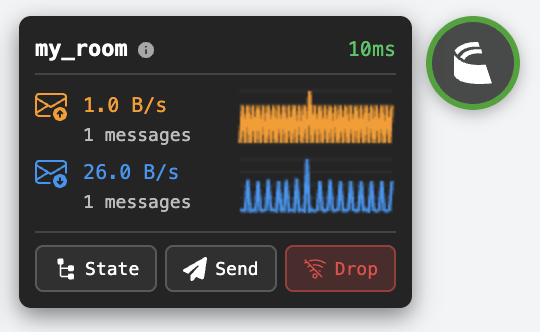
Troubleshooting: tsconfig.json Configuration
If you define your state with the @type() decorator style and target ES2022 or ESNext, ensure your tsconfig.json includes:
{
    "compilerOptions": {
        "useDefineForClassFields": false,
        "experimentalDecorators": true,
        "strict": true
    }
}
These flags are required only for @type() decorators. The recommended schema() builder works without them.
Next Steps
- Client SDK API Reference - Full API documentation for all methods, events, and room operations
- State Synchronization - Understanding Schema definitions
- State Sync Callbacks - Listen for state changes
- Phaser Tutorial - Complete game example
 React
React