Dashboard & widgets
The admin panel homepage hosts a grid of widgets, small cards that surface live data from your database or runtime. Five preset widgets are enabled by default, and you can append custom widgets for anything else you want at a glance.
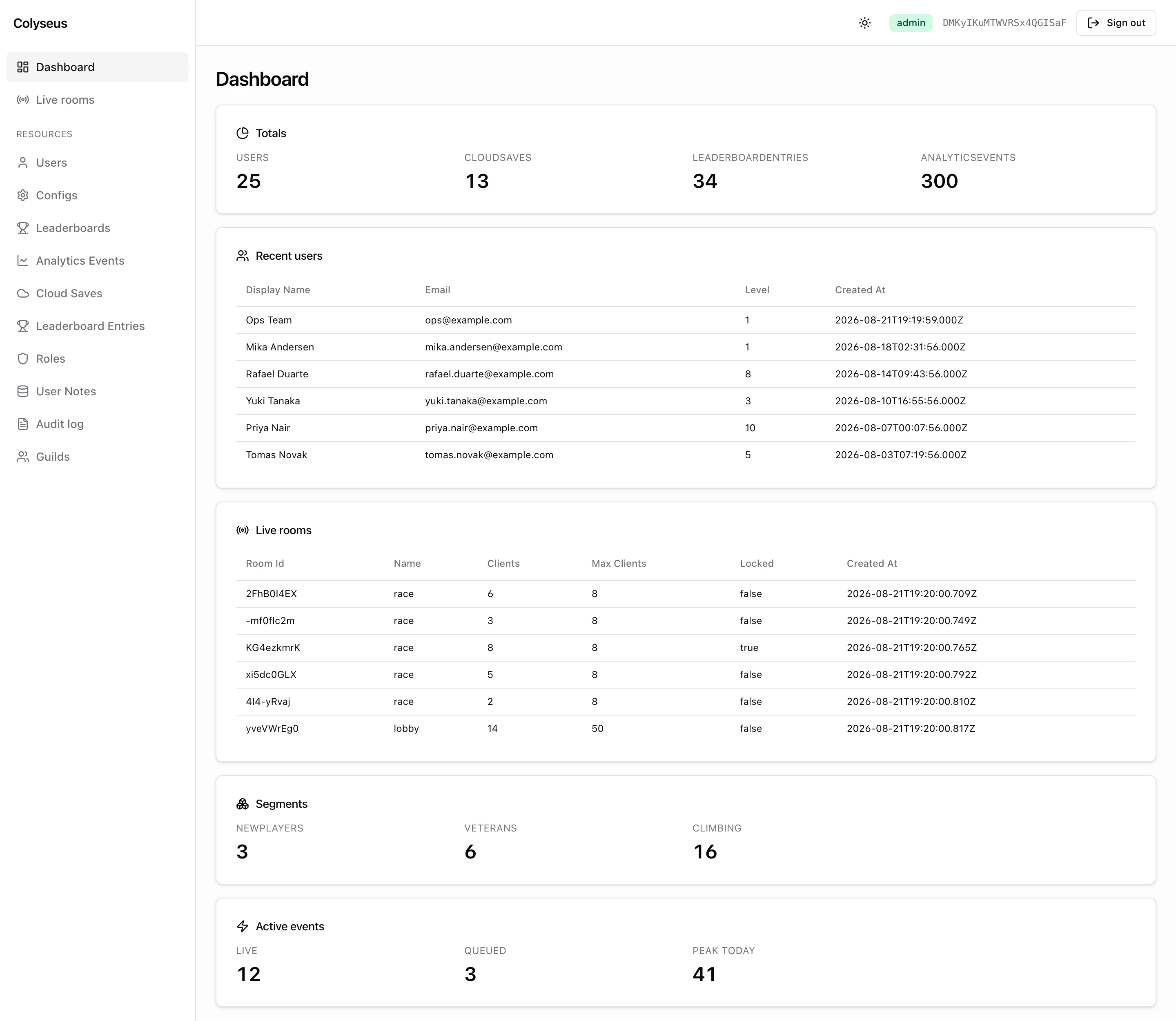
routes: createRouter({
    ...admin({
        database: db,
        dashboard: {
            presets: {
                totals: { only: ["users", "cloudSaves"] },
                recentUsers: { limit: 10 },
                health: false, // disable
            },
            widgets: [{
                title: "Active events",
                icon: "thunderbolt",
                render: "kpi",
                data: async () => ({ live: 12, queued: 3 }),
            }],
        },
    }),
}),
The dashboard is served by GET /admin-api/_dashboard, which returns { widgets: [...] } with one entry per widget. Both this route and the per-widget refresh route are operator-only. Any admin or mod can load them (mods regardless of scope); a plain user gets 403.
Preset widgets
| Preset | Default title | Render | Surfaces |
|---|---|---|---|
totals | Totals | KPI | Row counts per table in database.tables, a useful “DB is healthy” snapshot. |
recentUsers | Recent users | Table | Newest user registrations with deep-link to each user’s show page. |
liveRooms | Live rooms | Table | Currently-active rooms from the matchmaker driver with deep-link to the room inspector. Refreshes every 3 seconds. |
health | Database health | KPI | Database connectivity check. Reports status and query latency. |
segments | Segments | KPI | One count per cohort registered with db.segments.define() (see Database). Empty when none are defined. |
All presets are enabled by default. Configure each via dashboard.presets.<name>:
| Value | Effect |
|---|---|
omitted or true | Enabled with defaults. |
false | Disabled: the preset is not rendered. |
| Options object | Enabled with customization. |
Preset options
Every preset shares three base options (title, icon, span) and adds preset-specific knobs.
totals
totals: {
    title?: string;
    icon?: AdminIconName;
    span?: number;            // 1-24, see Widget shape
    only?: string[];          // restrict to a subset of table keys
}totals: { only: ["users", "cloudSaves", "leaderboardEntries"] }totals only knows the tables in database.tables (the built-ins). Custom tables passed through admin({ tables }) and unknown names are dropped silently. Count a custom table with a KPI widget instead.
recentUsers
recentUsers: {
    title?: string;
    icon?: AdminIconName;
    span?: number;
    limit?: number;                  // default 5
    columns?: UserColumnName[];      // subset of users columns, in order
}recentUsers: { limit: 10, columns: ["id", "email", "createdAt"] }columns uses the drizzle property names of your users table (createdAt, plus any column you added when extending the schema). Without columns the widget returns entire user rows to the browser, including passwordHash. Set columns on any panel that is not strictly local.
liveRooms
liveRooms: {
    title?: string;
    icon?: AdminIconName;
    span?: number;
    limit?: number;                          // default 10
    columns?: LiveRoomColumnName[];          // default: roomId, name, clients, maxClients, locked, createdAt
}liveRooms: { limit: 20, columns: ["roomId", "name", "clients", "processId"] }Available columns: roomId, name, clients, maxClients, locked, private, createdAt, elapsedTime, processId, publicAddress. maxClients renders as ∞ for uncapped rooms and elapsedTime is raw milliseconds. The 3-second refresh is built into the preset and is not configurable.
health / segments
Both accept only the base options (title, icon, span). No preset-specific knobs.
Custom widgets
Append your own widgets via dashboard.widgets. The widget list is resolved once when admin() runs; each widget’s data function runs on every dashboard request and its result is sent to the client:
widgets: [{
    title: "Active events",          // also the basis for the auto-derived id
    icon: "thunderbolt",             // AdminIconName
    render: "kpi",                   // 'kpi' | 'table' | 'list' | 'json' (default 'json')
    span: 12,                        // 1-24 grid span (half width)
    refreshIntervalMs: 5000,         // poll for live updates
    data: async ({ database, userId }) => ({ live: 12, queued: 3 }),
}]
Widget shape
interface DashboardWidget {
    id?: string;             // defaults to slugify(title)
    title: string;
    icon?: AdminIconName;
    render?: WidgetRender;   // 'kpi' | 'table' | 'list' | 'json' (default 'json')
    span?: number;           // 1-24; default per render type
    refreshIntervalMs?: number;
    data: (ctx: { database: GameDatabase; userId: string }) => Promise<unknown>;
}| Field | Notes |
|---|---|
id | Stable identifier, also used for data-testid="widget-<id>". Defaults to slugify(title) (e.g. "Live events" → "live-events"). admin() throws at startup when the id collides with a preset or another widget, or when the title slugifies to an empty string. |
data | Server-side resolver. Receives the resolved GameDatabase and the requesting admin’s userId. Errors are caught and surfaced to the panel as { error } on that card only. |
refreshIntervalMs | When set, the client polls GET /admin-api/_dashboard/<id> at this cadence and refreshes the card in place (no full dashboard reload). |
span | Width on a 24-unit scale, mapped onto the panel’s grid. Defaults: kpi/table/json full width (24), list half (12). The grid collapses to a single column on mobile widths regardless of span. |
Render modes
The render field tells the panel how to interpret data’s return value.
kpi
data returns Record<string, number | string>. The panel renders each entry as a label/value card, with the key as the label.
{
    title: "Player counts",
    render: "kpi",
    data: async ({ database }) => {
        const [total, banned] = await Promise.all([
            database.drizzle.$count(database.tables.users),
            database.drizzle.$count(database.tables.users, isNotNull(database.tables.users.bannedUntil)),
        ]);
        return { total, banned };
    },
}
table
data returns TableWidgetData:
interface TableWidgetData {
    columns: string[];           // header order; auto-humanized for display
    rows: Array<Record<string, any>>;
    linkTo?: {
        resource: string;        // admin resource key to link to
        idColumn?: string;       // row column with the FK value; default 'id'
    };
}
When linkTo is set, the panel makes each row clickable and navigates to that resource’s show page (rooms links into the room inspector). This behavior is useful for “recent X” widgets that should deep-link back to the records.
{
    title: "Top guilds",
    render: "table",
    data: async ({ database }) => ({
        columns: ["id", "name", "memberCount"],
        rows: await database.drizzle.select().from(guilds).orderBy(desc(guilds.memberCount)).limit(10),
        linkTo: { resource: "guilds" },
    }),
}
list
data returns Array<{ title: string; description?: string }>. The panel renders a simple labeled list, good for status feeds or named items without tabular structure.
{
    title: "Recent events",
    render: "list",
    data: async () => [
        { title: "Server deployed", description: "v1.4.2, 12 minutes ago" },
        { title: "Hotfix applied", description: "v1.4.1, 2 hours ago" },
    ],
}
json
data returns anything. The panel pretty-prints it in a scrollable code block. Default render mode when render is omitted (useful for ad-hoc diagnostics).
{
    title: "Cache stats",
    render: "json",
    data: async () => cache.stats(),
}
Refresh and polling
By default, widgets resolve once when the dashboard loads. For live data, set refreshIntervalMs to enable client-side polling of GET /admin-api/_dashboard/<id>. Only the affected card re-renders, which is useful for a live rooms count or active sessions card without paying for a full dashboard refresh. The first refresh fires one interval after the page loads; a failed poll keeps the last good value.
{
    title: "Signups today",
    render: "kpi",
    refreshIntervalMs: 3000, // every 3s
    data: async ({ database }) => {
        const since = new Date(Date.now() - 24 * 60 * 60 * 1000);
        return {
            signups: await database.drizzle.$count(database.tables.users, gte(database.tables.users.createdAt, since)),
        };
    },
}
Next steps
- Resources & CRUD: for the underlying tables that widgets pull from.
- Live rooms: the room inspector that
liveRoomsand your custom widgets can deep-link into.